For the last few weeks they've lived on a Proxmox VM in my homelab, running in codeg behind a Cloudflare Tunnel. My laptop, phone and Chromebook are just windows into them. Here's how it's wired up, and the one thing that broke.
How I got here
Last year I wrote about Claude Code calling Gemini CLI for a second opinion. It worked, but it was duct tape: one terminal, one machine, Claude shelling out to another CLI and parsing whatever came back. Close the lid, and the whole "team" went to sleep.
What codeg is
codeg is an open-source workspace for coding agents. It runs Claude Code, Codex, Gemini CLI, Antigravity and a bunch of others over ACP (Agent Client Protocol) and keeps all their sessions in one place. Two things matter to me:
- One UI for every agent. I don't care which CLI a session came from. It's in the sidebar and it's searchable.
- Agents can hand work to each other. In a Claude session I type
@Codex, and Claude delegates part of the task to a Codex session. It's off by default; you switch it on under Settings → Collaboration.
It ships as a desktop app, a Docker image, or a standalone server. I run the server, version 0.41.2 at the time of writing.
Agents that aren't in the same conversation
The old Claude + Gemini setup had no real version of this. Gemini's answer landed in Claude's context, and that was it. There was no session I could open later. When a lead agent in codeg delegates, the sub-agent gets a fresh session of its own. It doesn't see the lead's conversation, only the brief the lead writes. The answer goes back to the lead, and the full transcript stays in the sub-agent's own session, where I can open it. It does work in the same folder as the lead, though, unless it's given its own worktree, so two agents editing the same files can still trip over each other.
That sounds like a flaw until you want an unbiased review. A reviewer that has read the whole chat inherits every bad assumption made along the way. A reviewer that sees only the brief and the code doesn't. It also forces the lead to write a proper brief.
The setup
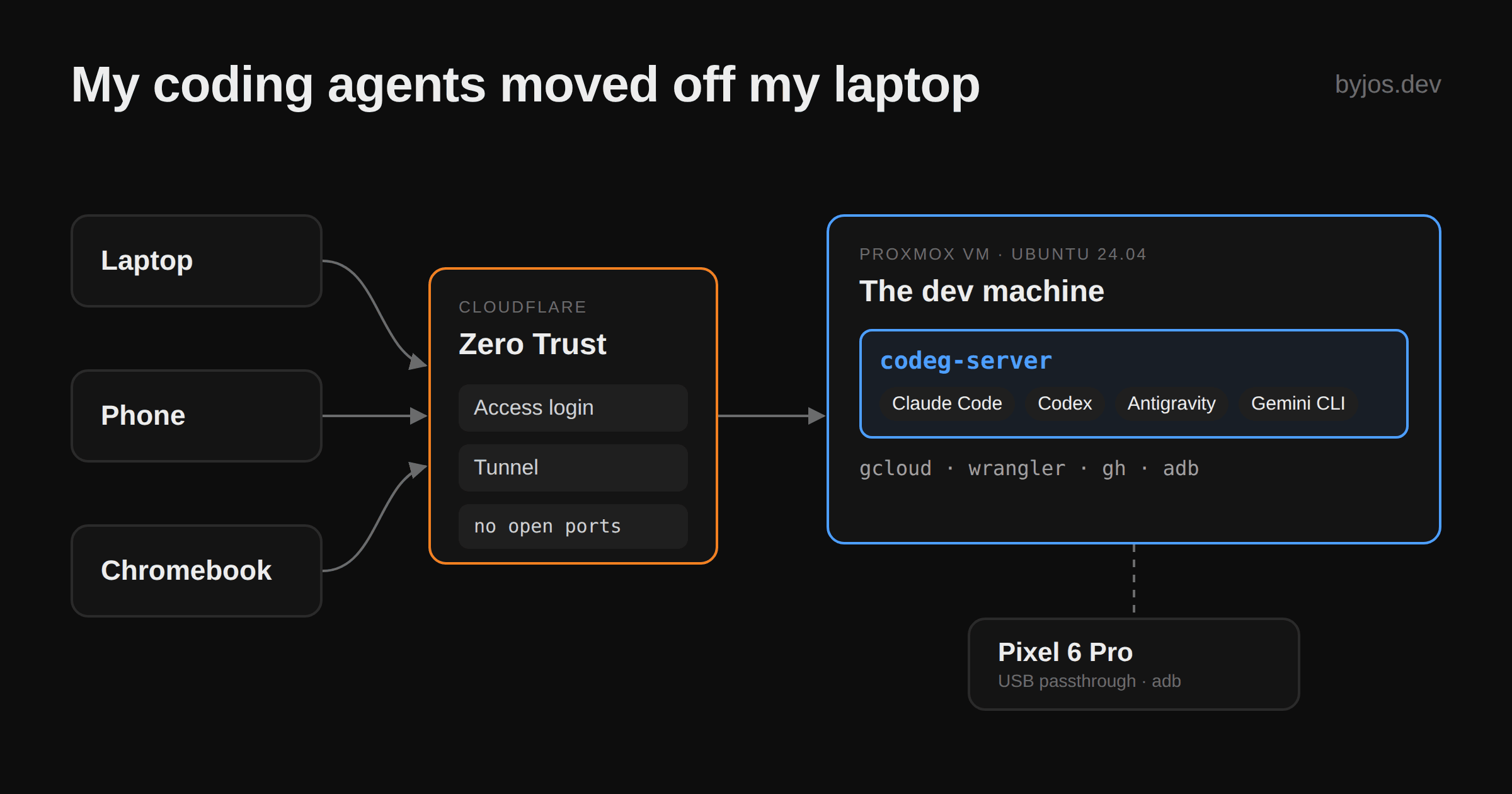
The VM
A plain Ubuntu 24.04 VM on Proxmox: 6 vCPU, 11 GiB of RAM. With codeg and three Claude sessions open it sits at around 3.5 GiB. The CPU is mostly idle while agents wait on API responses. RAM is what actually scales: every session spawns its own agent process plus a little codeg-mcp helper.
No Docker, on purpose
Normally I'd reach for a container. Here a bare VM is the point. I want gcloud, wrangler, gh, Node via nvm and whatever else a project needs installed once on the box and logged in. I don't want them baked into an image I rebuild every time an agent says "I need X". It's a disposable dev machine: no snapshots, no backups. If it dies, I won't cry. The code lives in git, and the rest is an evening of reinstalling CLIs and logging in again.
The install script puts four binaries (codeg-server, codeg-mcp, codeg-cli and codeg-computer-helper) into /usr/local/bin and the web UI into /usr/local/share/codeg/web. That's the whole install:
curl -fsSL https://raw.githubusercontent.com/spacering-net/codeg/main/install.sh | bash
CODEG_STATIC_DIR=/usr/local/share/codeg/web codeg-server --supervise
Two things from the docs that are easy to miss:
--supervisekeeps codeg running through its self-updates and rolls back to the previous version if a new one fails to boot. It can't undo a database migration, though, and it doesn't start codeg after a reboot. You need your own systemd unit for that.- Restarting the server kills running agent sessions. Don't upgrade in the middle of a long run.
A real phone on a USB cable
There's a Pixel 6 Pro plugged into the Proxmox host and passed through to the VM over USB. To the VM it's just another line in adb devices. So in a conversation about one of my Android apps, the agent doesn't stop at "it compiles". It can build the app, adb install it, launch it, read logcat, grab a screenshot with adb exec-out screencap -p, and check its own change on real hardware before I look at it. That works for UI tweaks, and it's even better for backend changes: the agent can check a feature it just deployed through the actual app instead of just curling an endpoint.
It's another reason the VM isn't a container. The SDK, the phone and the agent's shell are all in the same place, with nothing to forward.
Cloudflare Tunnel
I reach codeg through the Cloudflare Tunnel I already use for the rest of the homelab, so it's just one more hostname. No open ports on the router, and Cloudflare handles TLS. Handy, because codeg only speaks plain HTTP.
The catch is what sits behind that hostname: an agent with a shell on your VM. A token alone is a thin lock for that, so Cloudflare Zero Trust sits in front: you have to get through Access before you even see codeg's login. Since 0.39.0, codeg can trust Access directly (CODEG_AUTH=proxy-jwt plus a few CODEG_PROXY_AUTH_* settings), so you only sign in once. That option didn't exist when I set this up, so I still log in twice.
Three devices, one workspace
The Chromebook is the surprise. It has never been a dev machine for me. With codeg in a browser tab it suddenly is one, because everything heavy runs on the VM and the Chromebook only renders a chat window and diffs.
And I switch all the time. Right now I'm at the laptop. In a moment I'll be answering the same agent from my phone, sitting on the toilet. Same session, same context, nothing to sync.
What broke: the phone
Sometimes, mostly when I was on the phone, the conversation just stopped. Claude halted mid-task as if I'd pressed cancel. On the laptop it rarely happened.
My first guess was the mobile browser: it suspends background tabs and drops their WebSockets, and with a Cloudflare Tunnel in the middle every reconnect is a brand-new connection. Then I found issue #386: after the phone comes back from the background, the page stops showing the agent's output. So maybe Claude never stopped at all, and only the page did. Version 0.39.0 fixed the page not catching up on the rest of the reply, and since upgrading I don't think I've seen it again.
It feels like codeg grew up as a desktop app, and "server on a VM, clients coming and going" is the newer, rougher mode. It was never a dealbreaker, and it's clearly being worked on. I stick to the web UI. codeg has native iOS and Android apps (still test releases), but I haven't touched them, so I can't say whether they handle this better.
What's next
Automations. They can start a headless session on a cron schedule, by default in a fresh git worktree, and each run shows up as a normal conversation in the sidebar. The plan is an overnight run on marketing strategy: a lead agent does the research and hands parts of it to the others, and I read the result in the morning. I haven't tested yet whether delegation behaves the same inside an automation run as in a normal session.
Should you bother?
If you use one agent on one machine, you don't need this. If you already juggle two or three agent CLIs, have a box at home or a cheap VPS, and want to check on your agents from the couch, it's worth an afternoon.

No comments yet